Like every year, we do our testing of the latest from Samsung personally, regardless of the fact that you can find plenty of reviews out there, especially from famous “YouTubers.” What interests me is to see firsthand how right the others are, especially as a “fan” and user of this company’s products for years now.
The Galaxy S26 Ultra is the choice for most users who want the best from Samsung, and on the market, but I usually opt for the slightly smaller versions even though I have to accept missing out on some features. That is why I took the Ultra model for a test drive, especially since it has novelties I really wanted to try out.
First impressions and design differences
Expectedly, when first unboxing and turning on the Galaxy S26 Ultra, I didn’t get the impression of using a brand-new phone. It’s well known that technology has reached a certain “peak,” and when you add the frequent release of new phone versions to that, we don’t get as massive of a difference from model to model as was the case over 10 years ago.
In my opinion, that’s actually a good thing, so there’s no need to return to the early trend of completely changing the design for every new model; now we know exactly what to expect from each manufacturer. To me, it’s even weird when I see some manufacturers make every new version with a different design—it almost comes off as somewhat unserious now.
However, after detailed “tinkering” and examining the phone, the subtle differences start to emerge, and it’s clear that the phones aren’t 100% identical every year.

The first difference you can notice is in the corners of the phone, which are even more rounded this year, something Samsung recently started practicing with the Ultra series. Personally, I like the Ultra series much more with rounded corners; previously, it looked somehow very “boxy” to me. Samsung made a great decision on this front, and this year this part looks even better.
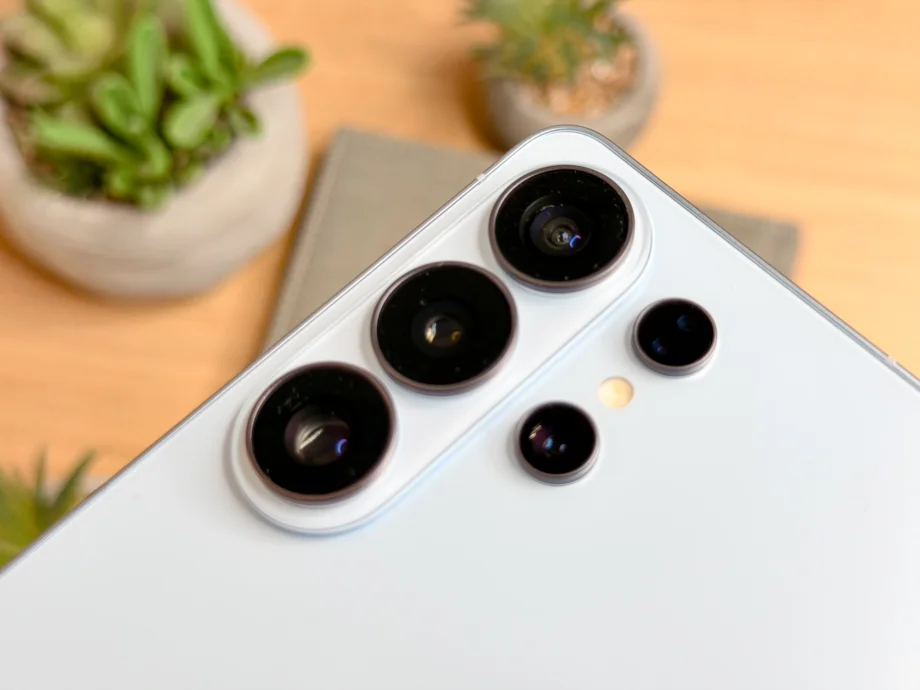
Speaking of good design decisions, a difference can also be spotted with the cameras on the back. They are now placed on a separate module, rather than individually like on last year’s model. Maybe it’s just the need for some kind of change, but I think the Galaxy S26 Ultra looks much better, even though these are fairly subtle tweaks.
The phone is also the thinnest Ultra model to date, and you can actually notice that during use, even though it’s a matter of millimeters. Combined with the lower weight, this rather large device is quite comfortable to use, and I have to say, quite a bit more comfortable than its competitor, the iPhone 17 Pro Max.

A return to aluminum, after using titanium
Samsung caught some flak for this, to put it briefly, and mainly not because of the material choice itself, but because of following Apple. They literally started using titanium after their competitor made that decision, and following Apple’s return to aluminum, Samsung followed suit and did the same.
What exactly drove Apple’s decision isn’t entirely known—maybe it’s the price difference and the tendency to overheat when aluminum isn’t used—but either way, we are back to this material. Although titanium sounds more prestigious, the new aluminum alloy allows for an even thinner and lighter build, even though it’s slightly more prone to scratches if you don’t use a case.

Privacy Display is the main new feature the Galaxy S26 Ultra will be known for
Privacy Display is the new feature that seems likely to put an end to privacy screen protectors, which I’m not sure how popular they actually are, but supposedly younger users pay much more attention to who and what can be seen from the side when they use their phones. Maybe that’s the case because younger folks are on their phones all day looking at various videos and pictures, so it’s understandable they wouldn’t want people nearby to see what they are looking at in public.
As you surely know by now, Privacy Display is a feature that prevents anyone on the side from seeing what’s displayed on the screen. Even better, you can choose to have this side-dimming work only in specific situations, or even just for certain parts of the screen, like password fields or notifications. Of course, there is the option to have the screen fully “protected” so nothing can be seen from the side at all.

The functionality of this novelty comes from the way the display is built. Samsung uses two types of pixels: ones that shine standardly and ones designed to be directed straight ahead. However, this feature does come with certain “issues,” so it’s a good thing it can be quickly toggled on and off via a shortcut. When the Privacy Display feature is on, the resolution drops, expectedly, as does the brightness—meaning the overall image quality takes a hit.
The solution is simple: Privacy Display doesn’t need to be on all the time, especially not when using the phone at home with no one around to snoop, so turning it on should only be a practice when genuinely needed. Still, even when the feature is completely turned off, the viewing angles and the anti-reflective layer are objectively worse compared to last year’s model, so we’ll see how many users will actually notice that.
Video quality reaches a whole new level with the “Horizontal lock” feature
Sales of video stabilizers, or “gimbal” devices, might realistically drop because of this new Samsung feature. I’m kidding,of course—those who truly need a gimbal won’t give up these useful gadgets, but average users will be able to improve their footage and make it look as if they’re using one.
The “Super Steady” feature, which provides pretty good image stabilization, gets a new capability on the Galaxy S26 Ultra called “Horizontal lock.” Basically, by enabling this feature while recording, you can move and twist your phone as much as you want, and the footage will always remain level and stable, as if you were trying to move as little as possible.Although the situations where I’d use this feature don’t pop up exactly every day, for me it is more useful and important than the Privacy Display, but to each their own.
Camera: Wider aperture, better night photography
Generally speaking, the S26 Ultra’s camera is slightly improved compared to its predecessor. The main sensor now has an f/1.4 aperture (instead of f/1.7), which means more light and better photos in low-light conditions, and the difference here isn’t exactly small. The 5x telephoto camera also got a wider aperture.
Daytime photos are excellent, sharp, with great dynamic range and natural colors. Nighttime photos show visible improvement, especially in detail and noise reduction. Video recording gets support for the APV codec, which is significant for those who want more control in post-production.
But let’s be real: if you’re coming from the S25 Ultra, the difference in the camera won’t be dramatic. These are incremental improvements, not a generational leap. If you shoot a lot of videos, you’ll be thrilled by the new options, like support for new codecs and the ability to record directly to an external drive. But looking at the big picture, the camera hardware doesn’t offer any revolutionary leap.
Performance and AI: Snapdragon 8 Elite Gen 5 and three AI assistants
Under the hood, the S26 Ultra runs on the Snapdragon 8 Elite Gen 5, specially tuned for Galaxy. The chip is blazingly fast, but that was also true for last year’s. The difference in everyday use is unnoticeable—apps open instantly, animations are fluid, games run without a hitch.
What’s more interesting is the software side. One UI 8.5 based on Android 16 brings something Samsung calls “Agentic AI,” a concept where the entire operating system, not just individual apps, understands context and executes tasks autonomously.
Specifically, the S26 Ultra now has three AI agents: Bixby, Google Gemini, and Perplexity. You can order a taxi via Gemini with a simple voice command, and Perplexity can be triggered with “Hey Plex.” The idea is that the phone will be able to perform multi-step tasks in the background without your constant interference.
Does this work as well as Samsung promises? Honestly, it depends. For simple tasks, yes, it works. For more complex scenarios, it’s still too early to tell if this is truly a game-changer or just another AI marketing wave. Samsung promises 7 years of security and system updates. This remains one of the strongest points of the Galaxy series and a concrete reason why this phone has a longer future than most competitors.
Battery and charging: Better, but still behind the competition
The 5,000 mAh battery is the same as last year. Samsung has bumped up the charging speed to 60W (Super Fast Charging 3.0), which gets you to 75% in 30 minutes, and a full charge takes about 40 minutes. This is an improvement, but far from what Chinese competitors are offering.
In testing, the battery comfortably lasts a full day with moderate use. Under heavy use—camera, gaming, navigation—you shouldn’t expect more than 6-8 hours of screen-on time. This is decent, but not impressive for a phone in this class.
And here we come to Qi2. That’s right: Samsung once again decided not to build magnets into the phone. The S26 Ultra supports Qi2 charging up to 25W, but only with a magnetic case. Apple has had this since 2020. Google added it to the Pixel 10 series. Samsung claims that 80-90% of users wear a case, so built-in magnets aren’t necessary. This argument is hard to defend, especially when Samsung itself sells magnetic accessories for the S26.
Final thoughts
The Samsung Galaxy S26 Ultra is an excellent phone. That’s not in question. It is powerful, well-built, with a great camera and software that will be supported for many years.
But it’s hard for some users to shake the feeling that Samsung has been selling the same phone for a few years now, every year with minor tweaks and one “main” feature. This year, that’s the Privacy Display, and it’s a genuinely interesting technology, but not without its compromises.
If you have an S25 Ultra, there’s no real reason to upgrade at all costs. If you have an S23 Ultra or older, the S26 Ultra is a solid investment, and if you’re switching from the competition, this is the most complete Android phone on the market—just don’t expect it to surprise you.